
INTRODUCTION
In this lesson you will…
Understand the importance of system updates, antivirus software and secure network and browsing practices.
Classify 5 network and browsing practices as secure or insecure.
INTRODUCTION
MODULE PRE-ASSESSMENT
Before we dive into building better cybersecurity habits, take a few minutes to assess your current practices.
Don’t worry it’s just a quick check to help you spot areas for growth!
When you are ready, click the button to begin the activity.

ACTIVITY READING
Secure Digital Practices
Click to expand each section below to learn more.
-
Definition:
A system update is when your computer, phone, or tablet gets important fixes and upgrades.Why It Matters:
Hackers look for devices that aren’t updated because they are easier to break into.Best Practice:
Install updates as soon as you are notified.It protects your students' and coworkers' information.
-
Simple Definition:
Antivirus software acts like a security guard standing at the entrance to your device.Why It Matters:
Malware can infect outdated software, stealing grades, medical records, payroll information and even your own private emails.Best Practice:
Always keep antivirus software turned on and updated.
-
Simple Definition:
A secure network is a trusted Wi-Fi or internet connection, one that keeps your data safe.Why It Matters:
Public Wi-Fi can expose everything you send or type, including passwords and private student data.Best Practice: Use your school’s secure network and credentials when accessing school systems or a trusted VPN (Virtual Private Network).
Mobile Devices and Social Media
 Click to enlarge [/caption]
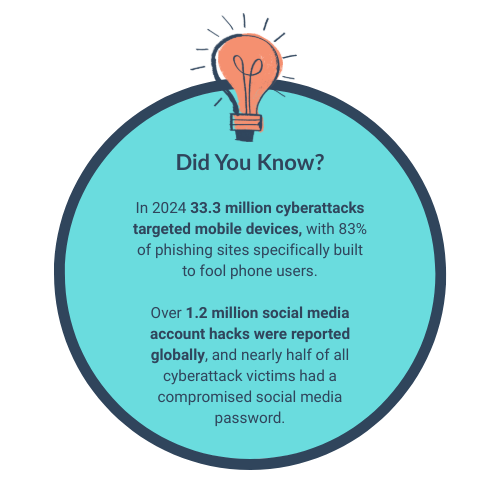
Mobile devices (phones, tablets) are mini-computers and they face the same risks as desktops.
Mobile devices and social media are prime targets for cyberattacks because they store personal data, are often used on unsecured networks (public WiFi) and provide easy entry points through apps, messages and social engineering tactics.
PAUSE TO PROCESS
Take a moment to recall what you have learnt.
When you are ready, click the button to begin the activity.

REVISITING THE READING
Checking in with your Habits
 Click to enlarge. [/caption]
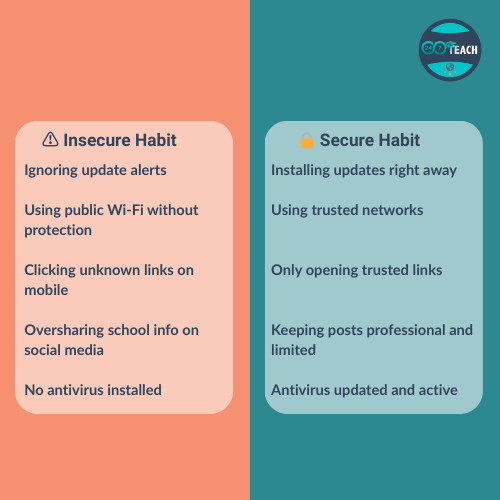
Take a moment to consider your digital habits. Some actions feel routine but they could be putting your students, your coworkers, or your school at risk.
Use this quick infographic to spot the difference between secure habits and risky ones.
JOIN THE CONVERSATION
What secure practices are you already implementing? How will you reset risky habits?
Will you add calendar reminders for updates? Or commit to keeping school posts off social media channels?
Share your responses below.